How the hotkey works
- Hold the hotkey and speak. The pill at the bottom of the screen shows a level meter.
- Let go. blabe transcribes and pastes.
- To cancel, press Esc while you hold the hotkey. Pressing any other key while you hold it is treated as a shortcut and cancels the dictation too.
Prefer not to hold a key? In Settings → General, set Mode to Press to start, press again to stop. Press the hotkey once to start and again to stop; the pill shows how to stop. Esc cancels, and a recording stops by itself after 5 minutes and is transcribed.
Choose a different key
In Settings → General, pick a Hotkey:
- Ctrl+Win, the default.
- Right Ctrl on its own.
- Right Shift on its own.
Right Ctrl and Right Shift leave the left-hand keys working as usual for shortcuts.
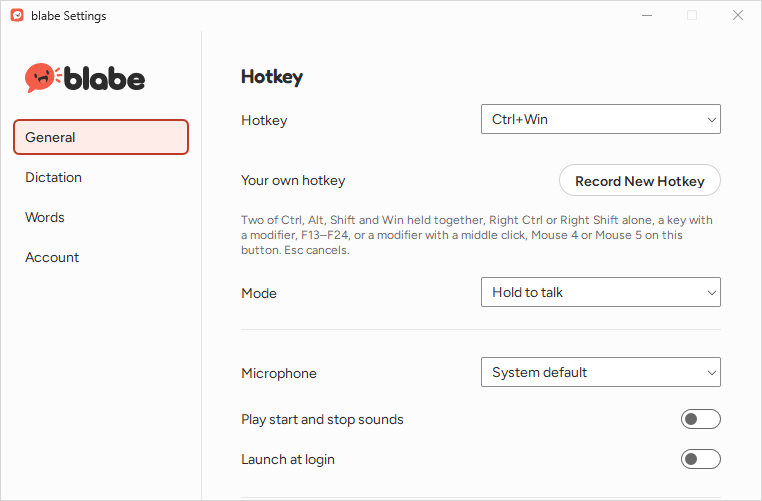
Record your own
Click Record New Hotkey. The button reads “Press your hotkey…”: press what you want to use, or press Esc to stop without changing anything. Reset to Default (Ctrl+Win) appears once you’ve changed it. You can record:
- Two of Ctrl, Alt, Shift and Win held together, such as Ctrl+Alt+Win or Shift+Win.
- Right Ctrl or Right Shift on its own.
- A key with a modifier, such as Ctrl+Win+J.
- F13 to F24 on their own, if your keyboard has them.
- A modifier with a mouse button: a middle click, Mouse 4 or Mouse 5. To record a mouse button, hold the modifier and click the button on the Record New Hotkey button itself.
Keys blabe won’t use
Some keys would break typing, shortcuts or other keyboards, so blabe refuses them and says why:
- Right Alt. blabe says: “Right Alt is AltGr on many keyboards, so it can’t be the hotkey.”
- Another modifier on its own, such as Left Ctrl or Left Shift. blabe says: “On its own, Left Ctrl is needed for shortcuts. Try Right Ctrl, Right Shift or a combination.”
- A mouse button without a modifier. blabe says: “Add Ctrl, Alt, Shift or Win to use a mouse button on Windows.”
- Left or right click. blabe says: “Left and right click can’t be the hotkey. Try a middle click or a side button.”
- Esc. blabe says: “Esc cancels dictation, so it can’t be the hotkey.”
- Enter. blabe says: “Enter sends messages, so it can’t be the hotkey.”
- Caps Lock. blabe says: “Caps Lock can’t be the hotkey.”
- Alt+Shift or Ctrl+Shift. blabe says: “Alt+Shift switches keyboard layouts, so it can’t be the hotkey.”
- Ctrl+Alt without Win. blabe says: “Ctrl+Alt is AltGr on many keyboards, so it can’t be the hotkey. Add Win, or pick another.”
- Windows shortcuts such as Ctrl+Win+D or Ctrl+Win+←. blabe says: “Ctrl+Win+D is a Windows shortcut, so it can’t be the hotkey.”
- Everyday shortcuts such as Ctrl+C, Ctrl+V or Ctrl+Z. blabe says: “Ctrl+C is an everyday shortcut, so it can’t be the hotkey.”
- A typing key without Ctrl, Alt or Win. blabe says: “On its own, A would stop working for typing. Add Ctrl, Alt or Win, or pick an F-key.”
- F1 to F12 on their own. blabe says: “Use a key with Ctrl, Alt, Shift or Win, or F13–F24.”
Right Alt is refused because on many keyboard layouts it’s AltGr, which types characters such as @, € or accented letters.
Prompt mode
blabe for Windows has one hotkey, for dictation. Prompt mode, which turns what you say into a prompt for an AI assistant with a second hotkey, is in blabe for Mac only for now. AI cleanup works on Windows; turn it on in Settings → Dictation.