Compare
blabe vs Wispr Flow
Dictation that weighs 4.6 MB.
blabe is a Wispr Flow alternative for developers on Mac and Windows. One small native process, about a second from speech to text on a Mac, and room left over for your editor, your builds and your agents.
- about 1 sspeech to text on Mac
- 4.6 MBMac download
- 12.5 MBWindows download
- One processon Mac and Windows
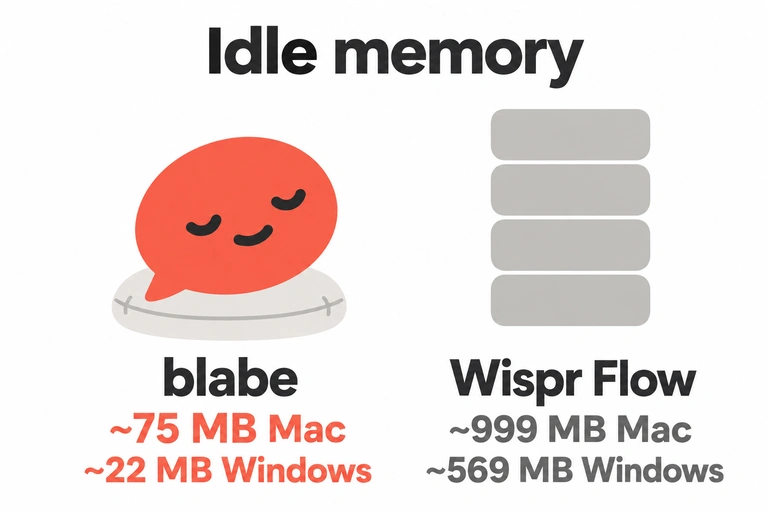
- about 75 MBidle on Mac
- about 22 MBidle on Windows
The short version
If you want a Wispr Flow alternative that stays out of the way, blabe is built for that. On a Mac it's a 4.6 MB download that runs as one process at about 75 MB of memory when idle. On Windows it's a 12.5 MB download, and it idles at about 22 MB. Wispr Flow takes up about 511 MB on disk on a Mac and uses close to 1 GB of memory in the background (measured by Vokalu, Oct 2026).
If you dictate prompts, commits and messages on a Mac or PC and want nothing heavy running beside your editor, try blabe.
At a glance
| Feature | blabe | Wispr Flow |
|---|---|---|
| Download and install size | Mac: 4.6 MB download, 10.3 MB installed. Windows: 12.5 MB download. (how we measured) | Mac: 511 MB on disk. Windows: 584 MB install folder. (measured by Vokalu, Oct 2026). Wispr asks for about 500 MB free on Mac and about 200 MB on Windows (system requirements). |
| Idle memory, Mac | ~75 MB (how we measured) | ~999 MB in the background on an 8 GB M3 MacBook Air (measured by Vokalu, Oct 2026). Wispr later reported 27% less memory used for dictation (Wispr on X, Oct 7, 2026). |
| Idle memory, Windows | ~22 MB (how we measured) | ~569 MB in the background (measured by Vokalu, Oct 2026) |
| Processes | One, on Mac and on Windows. No helpers. | The app plus its bundled browser runtime's helper processes (Vokalu, Oct 2026) |
| Speech model | xAI's Grok Voice Transcribe 2.0 by default, or Microsoft's MAI-Transcribe 2, in the cloud. | Canto, Wispr's own speech model, rolled out to everyone on Sep 17, 2026 (Wispr changelog). It starts from a model "pretrained on millions of hours of speech and text" (Canto). |
| Cleanup step | Your choice: AI cleanup Aggressive, Standard or Off. When it's on, AI cleanup runs on blabe's service. When it's off, no language model touches your text. (details on privacy) | Fine-tuned Meta Llama models clean up the transcript, served on Baseten (Baseten case study). Wispr's subprocessor list names OpenAI, Anthropic, Cerebras, Baseten and Fireworks AI for formatting and Command Mode (list via sub-processors.com). |
| Cloud or local | Cloud. It needs the internet to transcribe. | Cloud. "Transcription always occurs on the cloud" (Data Controls). |
| Your dictations train their models by default | No. blabe never trains models on your data. Microsoft says it doesn't use customer data to improve its Speech models. xAI says it doesn't train its models on the requests blabe sends it, and neither do blabe's AI cleanup providers. (privacy) | On Free and Pro, "Improve the model for everyone" is on by default, and you can turn it off (Wispr security overview). Wispr's privacy page says training is off and locked on Growth and Enterprise; its pricing table lists "Models never trained on your data" under Enterprise. |
| Price | Free with your key (your own xAI or Azure key), or $7.99 a month or $69 a year. One plan, up to 3 devices, transcription included, no meter or monthly allowance (fair use applies). | Free: 2,000 words a week on desktop, 1,000 on mobile. Pro: $15 a user a month, or $12 a month billed yearly ($144 a year). Growth: $23 a month, or $18 billed yearly. Enterprise: custom (pricing). |
| Free to try | 2-day trial with up to 30 minutes of audio. No card, no email, no sign-up. | Free plan with a weekly word limit, no card needed (pricing). |
| Platforms | Mac (macOS 14 or later, Apple silicon or Intel) and Windows 11 on x64. | Mac (macOS 12 or later), Windows 10 or 11 on x64, iPhone (iOS 18.3 or later) and Android 13 or later (system requirements). |
Size and memory
Why so light
blabe is native on both systems: Swift on the Mac, Rust on Windows. There's no browser engine inside it and no speech model to download, because transcription runs in the cloud. So the Mac app is a 4.6 MB download, 10.3 MB installed, and the Windows download is 12.5 MB.
When you aren't dictating, nothing runs but a once-a-day update check. On a Mac that's one process at about 75 MB and about 0.007% of one CPU core. On Windows it's one process at about 22 MB.

For comparison, Wispr Flow was measured by Vokalu, Oct 2026, at about 999 MB in the background on a Mac and about 569 MB on Windows, with 511 MB and 584 MB on disk. Wispr Flow ships its own browser runtime (Vokalu, Oct 2026). Wispr has since said dictation uses 27% less memory, and we haven't seen a new independent measurement.
Privacy defaults

blabe
- blabe never trains models on your data. Microsoft says it doesn't use customer data to improve its Speech models. xAI says it doesn't train its models on the requests blabe sends it, and neither do blabe's AI cleanup providers.
- The app has no analytics or crash reporting, and no telemetry beyond dictation times, as numbers only, with no audio or words.
- Your audio is held in memory and never saved to disk on your computer. blabe's transcription service passes it on and doesn't store it, or your transcripts. With Free with your key, it goes straight to your own xAI or Azure account.
- There's no dictation history. blabe keeps your last transcript in memory until you quit.
- AI cleanup is a setting. With it off, your transcript never goes to a language model.
- Your Transcription setting determines whether xAI or Microsoft transcribes your audio. The companies that transcribe or clean up your text decide how long they keep it under their own policies, and some, such as the cleanup backup, may keep requests for up to 30 days. The privacy policy describes every company involved and what each one keeps.
Wispr Flow
- Training on your audio, transcripts and edits ("Improve the model for everyone") is on by default on Free and Pro, and you can switch it off (security overview).
- Wispr gives you more switches than blabe has: Dictation cloud storage, Context awareness, and local history you can keep, auto-delete after 24 hours or never save. With cloud storage off, Wispr says audio is discarded once it's transcribed (Wispr privacy).
- Wispr says it has zero data retention agreements with all third-party AI providers used in dictation (Data Controls).
- Wispr always uses the name of the app you're dictating into and the surrounding text box content for formatting (Data Controls).
Which one to choose
Pick blabe if you dictate into Claude Code, Codex, Cursor or a terminal and want the tool to take as little of your machine as possible. One plan is $69 a year with no meter or monthly allowance (fair use applies). You choose between AI cleanup and your own words, and the app keeps no history.
Pick Wispr Flow if you're on Windows 10 or an older Mac (macOS 12 or 13), which blabe doesn't support, or you want to stay on a free plan with a weekly word limit.
Before you pick blabe: it needs the internet, macOS 14+ or Windows 11 (x64), and either your own xAI or Azure key (Free with your key) or a subscription after the 2-day trial.
FAQ
Is blabe a Wispr Flow alternative?
Yes. blabe is a dictation app for Mac and Windows, built for developers. Like Wispr Flow, it turns your speech into text in the app you're using, terminal included. It's a 4.6 MB download on Mac and a 12.5 MB download on Windows, and it costs $7.99 a month or $69 a year.
How big is each app?
blabe is a 4.6 MB download on Mac and idles at about 75 MB of memory in one process. On Windows it's a 12.5 MB download and it idles at about 22 MB. Wispr Flow was measured by Vokalu, Oct 2026, at 511 MB on disk and about 999 MB of memory in the background on a Mac, and 584 MB installed and about 569 MB of memory on Windows.
How much do they cost?
blabe has one plan: $7.99 a month or $69 a year, for up to 3 devices, with transcription included. Wispr Flow’s current plans are in the table above, each linked to its source. Prices were checked on October 16, 2026.
Does it work on Windows and Mac?
Yes. blabe runs on macOS 14 or later, on Apple silicon or Intel, and on Windows 11 on x64 PCs. Wispr Flow also runs on Windows 10, iPhone and Android.
Does blabe train on my dictations?
No. blabe never trains models on your data, and its service doesn't store your audio or your transcripts. On Wispr Flow's Free and Pro plans, "Improve the model for everyone" is on by default, and you can turn it off. Some providers that handle blabe requests may keep them for up to 30 days under their own policies; the privacy policy lists each one.
Can I switch from Wispr Flow?
Yes. Install blabe and click Start Free Trial: you get 2 days and up to 30 minutes of audio, with no card or email. Add your project's names to Words so they come out right, and choose a hotkey that doesn't clash with Wispr Flow's while you try both.
Try blabe free for 2 days.
No card, no email, no sign-up. macOS 14 or later on Apple silicon or Intel, or Windows 11 on an x64 PC.